Friday, 23 September 2016

iPhone 7

DAY 5 & 6: BATTERY LIFE AND IOS 10

The iPhone 7 lasts longer than the iPhone 6S, which in turn improved on the 6. It’s still not quite good enough to my mind.

Certain things don’t affect it much. If you like streaming video to your phone then you’ll have a good time with the iPhone 7. The screen and speakers are great and it doesn’t use up too much juice.

The A10 Fusion processor is more efficient and when the phone is coasting in your pocket or sitting unused on your desk it hardly uses any battery at all.

Gaming and using satnav apps do drain the battery quickly, though. I find myself very low on power by the time I get home at 7pm on most days. Used in the same way my iPhone 6S Plus would still be at 50%.

Basically the iPhone 7 it will last you until you plug it in to charge at night, unless you really hammer it.

Now you might have already upgraded to iOS 10 on your current iPhone. iPhone 7 comes with it out of the box and it’s a solid improvement to Apple’s mobile operating system. It feels a little faster and the notification screen is a whole lot more useful.

Progress has also been made on Apple Music app and Messages app. The latter seems to have taken all of Whatsapp’s and Snapchat’s biggest features and rolled them into a neat bundle.

If you want to know more about it read our in-depth iOS 10 review.


DAY 3 & 4: PERFORMANCE AND WATERPROOFING

The iPhone 7 feels faster than the iPhone 6S running iOS 9. Part of that is the newer iOS 10. It comes with accelerated animations, which makes it feel quicker than before.

That’s certainly not to say that Apple is trying to trick us with software improvements. Not at all. The iPhone 7 is the most powerful phone I’ve ever used – a statement borne out by its incredible benchmark results.

The iPhone 7 packs the new A10 Fusion core and it’s a blinder. There’s a reason for the ‘Fusion’ moniker. For the first time Apple is using a 2 x 2 core CPU configuration. Two of the cores are powerful and used for the heavy lifting – 3D gaming, multitasking and the like. The other two are low-powered and much more efficient – perfect for light tasks like sending texts.
If that all sounds familiar that’s because it’s not new. Plenty of phones have been using this method to preserve battery life, usually in 4 x 4 configuration. It’s based on ARM’s big.LITTLE design and I’ve generally been impressed with phones using it. The A10 Fusion is no different.

We’ve moved to the latest version of Geekbench 4 as it has a wider range of tests and better iPhone 7 compatibility compared to its predecessor.

The iPhone 7 is 30% faster than the iPhone 6S. It’s also 12% more powerful than the Galaxy S7.
It’s in the graphics department that the A10 really shines, though. The new six-core GPU scores a massive 37,349 on our standard Ice Storm Unlimited test – 30% better than the iPhone 6S and Galaxy S7. That really is incredible performance.
But the question it begs is – does it really matter? I always like having a powerful phone, but these devices are so powerful now that there aren’t noticeable differences in use. Sure games can jack up the polygons and look slicker, but other than that there’s not a huge amount to do on an iPhone that the previous generation A9 couldn’t handle.

I am looking forward to seeing the A10 in the next generation of iPad Pros, however.

Where the new processor really seems to make a difference to day-to-day use is to the iPhone 7’s battery life. I’m still testing its stamina, but so far it seems to last about 10% longer than before. Useful stuff.

So the iPhone 7 is fast and battery efficient, but it’s one of its other headline features that I’ve appreciated most of all over the past few rainy days.

Water-resistant phones have been around for a while, but up to a few years ago they were as much of a chore as a benefit. That’s because phones like the Sony Xperia Z1 and Galaxy S5 had annoying flaps over the charging port you had to make sure were shut tight. Not so with the iPhone 7. It manages to be IP67 (can last 30 minutes in up to 1m of water) without needing any flaps.

It’s not the first time a phone has done this. In fact both the latest Sony Xperia XZ and Galaxy S7 are water-resistant to a slightly better IP68 rating. They also manage to keep their headphone jacks. Imagine that.

Still, water-resistance is a great feature and one I needed on a wet weekend camping. The iPhone 7 breezed through a few downpours and a stint on some very wet grass. It really gives peace of mind.

Read on for day one and two of my review diary where I cover the design, cameras, design and screen quality. Come back soon for the next part of my iPhone 7 review in progress.
DAY 2: POPPING SCREEN AND LOUD SPEAKERS

One thing that is immediately apparent on the iPhone 7 is that the screen is warmer. Whites aren’t quite as dazzling as on the 6S and I actually prefer the old screen when reading an ebook or websites that have a white background.

That all changes when I want to watch a movie or scroll through my photo album.

The iPhone 7’s screen is richer than ever before, without looking oversaturated. Apple claims the range of colours it uses are wider. It has the DCI-P3 gamut that 9.7-inch iPad Pro and iMac uses, and that’s a very good thing. It means more colours and that means tones can be more realistic.

It’s perfect for a Netflix binge. Skin tones still look natural, but more life-like than before, and dark scenes look good too. Colours are punchier without losing the refinement I’ve always liked about iPhone screens. It’s definitely an improvement, but still not on par with the best AMOLED screens out there to my eyes.
The 4.7-inch screen is plenty sharp too, even though the resolution hasn’t changed. Apple is resolutely sticking to its Retina guns, and that’s fine – if you don’t want to use the iPhone 7 with a VR headset that is. Plonk it into Google Cardboard or similar and the resolution becomes an issue. If you don’t care about that then it’s no problem at all.

Sound is one of the areas that Samsung hasn’t really cracked with its Galaxy S range. HTC does a much better job thanks to the stereo Boomsound speakers and the iPhone 7 emulates these to some degree. It’s not quite as successful, though.

Let’s start with the good. The iPhone 7 is loud – very loud. In fact it’s almost twice as loud as the iPhone 6S and that’s a good thing if you’ve forgotten your Bluetooth speaker at home. You can happily use the iPhone 7 to listen to a few tunes around the campfire without it being drowned out by the lightest breeze or a crackling fire.

There are two speakers now, one at the bottom and one pumping straight out of the earphone slot. This means you get a little stereo separation, but they’re still too close to make it that noticeable.

Apple has done a great job cramming solid speakers into the iPhone 7, but it’s not performed miracles. There’s still a distinct lack of low-end thrills to be had. If you like your bassy music on the go then you’ll want to invest in some decent headphones or a good-quality Bluetooth speaker.

At its highest volume sound gets a bit harsh and tizzy too. Dialogue in a movie has a whiny edge to it. Notching the volume down a few levels helps cure this.

I am being overly picky here, though. The iPhone 7’s speakers are some of the best on any phone. There’s a whole lot more depth and detail than you can get on its predecessors and the move away from dull, mono, sound is a welcome one.

Read on for day one of my review diary where I cover the design and cameras and come back soon for another update to my iPhone 7 review in progress.

Buy Now: iPhone 7 at Amazon.com from $809


DAY 1: DESIGN AND (LACK OF SOME) FEATURES

Let’s start with the headline-grabber, the lack of jack.

Rumours of the trusty 3.5mm headphone jack’s demise on the iPhone 7 have been circling for almost a year now and it turns out they were true. The latest iPhone no longer supports the standard we’ve been used to for the last 50 years. Maybe it’s time for it to put on the slippers and retire along with Scart, VGA and SCSI, maybe not.

I didn’t get caught up in the furore over its omission. I’ve been using wireless headphones for years, and while my best-sounding headphones are wired, I find I use them less and less – a sacrifice for convenience. So far I haven’t experienced any withdrawal symptoms.

The iPhone 7 comes with a Lightning to 3.5mm headphone adapter in the box so you can still use wired headphones with it, however this is exactly the sort of niknak I typically end up losing within a week. Time will tell. Of course using this adapter means you’re taking up the Lightning port. I rarely use wired headphones while charging my phones anyway, so it’s an issue that bothers me less than the lack of connections on, say, the Macbook does.

There’s also a pair of Earpods with a Lightning connector in the box. I’ve never been a fan of Apple’s bundled white earphones and these haven’t made me change my mind one bit. If you decide to get the iPhone 7 then do yourself a favour, invest in pair of good wireless headphones, there are dozens to choose from even before Apple’s own Airpods go on sale.
So with that out of the way it’s time to cover the second big sticking point – the design.

The iPhone 7 looks a lot like the iPhone 6S and 6 before it. If you go for one of the standard colours then it’s almost identical.

There have been a few nips and tucks, though. The antenna band now curves to the top of the phone rather than strapping its back and the camera’s lines are curvier.
The limitations of the design are all still present. The iPhone 7 is larger than it should be. The bezel is thicker than we see on Android competitors and that means less screen to body. The Samsung Galaxy S7 is almost the same size but comes with a bigger screen. A few years ago I never thought I’d say that Samsung would be out-designing Apple, but that’s exactly what’s happened.

Still the iPhone 7 is slim, classy and dead easy to use in one hand. The bigger iPhone 7 Plus is another story.

Rather than go for an all new design what Apple has done is launch the iPhone 7 in two new colours – Jet Black and one simply called Black. The latter replaces Space Grey, but it’s the shiny former that took all the limelight during launch – and with good reason.

The Jet Black iPhone 7 looks like no other phone. It’s not like the plastic iPhone 5C – this is a phone made out of metal. It’s smooth to touch without being slippery. Yes it attracts fingerprints, but who cares when it looks this good? If you want to stand out then Jet Black is the iPhone 7 of choice.

Now while the aesthetics may not have changed much, plenty of the design has. For a start the iPhone 7 is officially water and dust-resistant with an IP67 rating. That means it can withstand a little of the wet stuff. It’s meant as a precautionary feature rather than an excuse to play Candy Crush while synchronised swimming, though.

The Home button is another element that’s different. I thought the lack of a physical button would feel weird, but eight hours in and I’m already used to it. At first I swore it had some give, I was sure I could feel it moving down. It's only when I turned the phone off that I realised I'd been duped. That’s how good the new haptic engine is. The feedback it gives you tricks your brain into thinking the button actually moves down. This isn’t smoke and mirrors, it feels real. I thought I’d miss the old iconic iPhone Home button, but I don’t.
IPHONE 7 CAMERAS

The feature I’ve been most anticipating is the camera. Like many things Apple, the results of the photos taken by the iPhone 6S and its predecessors belied the specs. A whole lot of software trickery goes into the pics yet they remain looking natural. It’s something I’ve always appreciated, even though the likes of top-end Samsung and LG smartphones are better in some scenarios.

Now the iPhone 7 comes with a new six-optic lens, Optical Image Stabilisation, a wider f/1.8 aperture and bigger pixels. All this leads to improved low-light performance that I noticed off the bat while taking photos at dusk.
Colours are more vivid and accurate on the iPhone 7

These are the improvements I was hoping for and on first impressions they deliver, as does the new 7-megapixel front facing camera.

So far though, I find it doesn't quite live up to the exacting standards of the Galaxy S7 in good light. I've chosen to compare it to the Galaxy S7 as we think it's the strongest camera phone around until now.


  • APPLE IPHONE 7 & 7 PLUS PRE ORDER FACTORY UNLOCKED ALL COLOURS MODELS **LOOK**

    FREE INTERNATIONAL DELIVERY!!
    • $1,010.50 to $1,706.08
    • Buy It Now
    • Free international shipping
    • 18+ watching
    • From United Kingdom
  • Friday, 9 September 2016

    Apple Watch

    Apple Watch

    I’ve been wearing Apple’s first wearable since it hit shelves last spring and in most ways my opinion almost entirely mirrors our initial review. Once you’ve looked past the typically stylish Apple design, the Watch is an overly complicated piece of tech that still doesn’t really know what it wants to be.

    In fact, the best move I’ve made so far is to completely turn off all notifications. The constant wrist vibrations became a nuisance, not aid, on too many occasions. Silencing them is the only reason I’ve been able to keep the Watch on this long. Maybe smartwatches aren’t meant to be hubs for all our communications after all.

    Even though watchOS 2 was meant to sort out the ridiculously slow app situation with native downloads, it’s still far from perfect. Apps still take an age to get going and they’re still mostly pointless. Aside from the handy music controls and fairly impressive Citymapper there isn’t much else that has made me think, ‘Wow, this really works on a watch.’

    WatchOS 2 did bring with it a few neat upgrades. The Nightclock feature is nice to have, though I wish I could keep it on all the time, like I can on the Moto 360 2. And don’t even try using it with the Milanese Loop strap, you need a tough one like the Sport Band to keep it upright.

    Time Travel, which lets you skip through the day by twiddling the Digital Crown, is great too. If you’re using some of new third-party complications it’ll show you when rain might be coming (through Dark Sky) and upcoming appointments.
    First generation Apple products are always more for the tech enthusiasts than the everyday consumer – remember the ridiculously expensive original iPhone or the almost useless first-gen iPad?

    So the thought of the Apple Watch Series 2 does still make me somewhat excited. But, it’s really the software that needs the biggest update and there are some big improvements expected from watchOS 3. It needs to be simpler, with less to do and a generally cleaner way of doing everything.
    Apple may not be the first technology company to release a smartwatch, however, it is debatably the first to generate any significant interest about a wearable.

    In fact, recent stats from Strategy Analytics suggest the Apple Watch already accounts for 75.5% of the smartwatch market.

    This is despite the fact Google made its opening move to conquer the smartwatch market over a year ago, when it released its wearable focused Android Wear operating system.

    However, while it may be enjoying early success there are quite a few niggling flaws in the Apple Watch that potential buyers should be aware of. These include common issues, such as poor battery life, as well as more local problems, like weird software glitches and unintuitive app interfaces.
    APPLE WATCH – DESIGN AND COMFORT

    The Apple Watch is the most attractive smartwatch by a country mile. It uses the most luxurious materials and it’s more discreet and elegant than the majority of its rivals. That’s the least we expected from Apple and from something that costs more than the alternatives, though.

    The casing, which is made from stainless steel, has a lovely polished sheen, while ceramic glass protects the heart rate sensor on the back. The Watch is beautifully constructed, though the Watch complements a smart shirt better than something more casual. Much of this comes down to the version and strap you choose, though, which we’ll get into in a minute


    First, an important question – it’s a beautiful smartwatch, but is it a beautiful watch in the traditional sense? Not really. A normal £600 watch doesn’t have to live with the compromises that most smartwatches, including the Watch, have to deal with and that shows. Pick up a similarly priced Nixon, a Seiko or Hamilton watch and you’ll instantly see what we’re talking about.
    Apple does live with those compromises better than most, though, specifically that issue of thickness. The Apple Watch isn’t thin. It’s about as thick as three British one pound coins (11.5mm thick to be precise), but you don’t notice the added bulk as much as some. The way the stainless steel case and screen curve inwards help create the illusion of a slimmer, more elegant timepiece compared to the Moto 360, which many feel is the most desirable Android Wear watch to date. It also helps that the Digital Crown and Friends button on the right don’t jut out too far, while you’ll barely notice the speaker and mic on the left that let you make and take calls.

    That thick body fits in an array of components, including 8GB of flash memory, the NFC radios ready for Apple Pay (US-only for now), sensors for tracking motion and Apple’s custom S1 processor. That’s accompanied by 512MB RAM and the whole chipset setup is supposedly more powerful than the first generation iPad.

    So far, so good, but it’s a little disappointing that the Apple Watch isn’t really waterproof. You’ll have to take it off before you get in the shower and don’t even think about going anywhere near a swimming pool. Apple says it meets the IPX7 water resistant certification, which means it’s suitable for running in the rain and doing the dishes with it on.
    There’s no shortage of strap options. Apple is offering a variety of leather, metal and more sport-friendly rugged straps with different types of buckles. It’s easy to remove and change them by locating and holding down the buttons on the back of the case to slide out the watch strap.

    We had the Milanese loop strap, which is the most jewellery-like in appearance. It complements the stainless steel body nicely, but it’s a little more feminine than the leather options. Unclip it and wear it around your wrist and you’ll see what we mean. Its magnetic clasp makes it easy to secure and means there’s no need to remove links to find that perfect fit. It’s not free from issues, though. The clasp has already picked up a fair few scratches, so it’s clearly not the most durable strap in the range.

    It is very comfortable, though, as is the Watch as a whole – it feels fine even when worn all day and night. It’s technically a little heavier than other smartwatches, but you’ll barely notice the extra weight. Thankfully, it’s elegant stature means it doesn’t stick out like a sore thumb and we’ve had no skin irritation issues during our time using it.
    APPLE WATCH – SCREEN

    If there’s something smartwatch manufacturers are not struggling with, it’s how to make great small screens. LG and Samsung lead the way, but that’s no surprise when they’ve been excelling doing the same for phones and TVs for some time now.

    The Watch we tested with the 42mm strap packs a 1.7-inch rectangular screen, which is bigger than the one used on the Watch with the smaller 38mm strap (1.5-inch). Apple is calling it a Retina Display, but unlike an iPhone, it’s swapped LCD technology for an LG-built flexible OLED one.

    On top lies a sapphire crystal coating, something you’d find on a similarly priced Nixon watch for instance. This is included to protect against scratches. It’s also meant to increase reflectivity, but that’s not something you’ll find an issue with on the Watch. The cheap Watch Sport has to settle for toughened glass.

    From a design perspective, the Watch screen is a beauty. There’s no obvious thick, ugly screen bezel, so all of that screen estate is dedicated to accommodating the operating system. Apple has hidden away the ambient light sensor – responsible for automatically dimming brightness – behind the screen, which is rather clever.
    The rectangular versus circular screen debate continues to divide and we’d still side with the more traditional approach. But the Apple Watch is the most convincing argument for a ‘smartphone inspired’ screen on a phone.

    The 1.7-inch screen has 322 pixels per inch and it’s right up there with the Samsung Gear Live for sharpness, colour accuracy and brightness. Whites have a slight blueish tint, but it’s virtually impossible to notice on such a small screen. Visibility is fantastic, as well. Day or night, you won't have to squint to read it and it copes well in bright sunlight.

    Another aspect of the screen is Force Touch – it’s one of the most interesting features on the Watch. It essentially forms part of the screen technology and makes it possible to detect the difference between light and hard presses on the screen. There’s nothing really like it on other smartwatches and while it takes some playing around to work out the apps compatible with it, it’s a clever way to add extra functionality to apps without having to over complicate the user interface or add more physical buttons.

    We’d say Samsung’s smartwatch screens remain the pinnacle, but Apple’s not too far behind for overall quality.
    APPLE WATCH – SOFTWARE & USING THE WATCH


    So Apple has more or less nailed the hardware. The Apple Watch looks good, has a great screen and is very comfortable. It will live and die on its software, though, and the Apple Watch feels like a first generation product. Apple, rightly or wrongly, has a reputation for easy to use software, but the Apple Watch isn’t easy to use.

    Even the setup is rather fussy. It takes a good 25-30 minutes to setup the Watch and its companion app so you can start using it – it’s trivial in the greater scheme of things, but also frustrating. Needless to say, the Apple Watch only works with iPhones, specifically the iPhone 5S and upwards, so iPhone 5 and 5C owners are out of luck.
    Once setup, there’s no escaping the feeling the Apple Watch is clunky and unintuitive. You’ll accidentally swipe a screen when you can’t or press the Friends button instead of the crown for a while. The relationship between iPhone and Watch adds to the confusion as well. It’s all a little bit chaotic. It’s a steeper learning curve than Android Wear, which definitely has its own software issues to resolve.

    It starts out in a familiar way. There’s a drop down notification bar and a Control Center you can view from swiping up on the touchscreen. But the app homescreen is completely different – it’s looks a bit like a level from Bubble Bobble with all of its floating app icon bubbles. These can be rearranged from the Apple Watch phone app.
    Digital Crown & Taptic Engine

    Key to navigating this interface is the Digital Crown – a modern take on the traditional crown and a unique approach compared to Android Wear alternative. This means navigation isn’t based on the touchscreen alone. It's main and most useful function is twisting to zoom into a map or scroll through a text message, as using the crown won’t obscure what you’re looking at. You can push to jump to the app home screen or hold down to activate Siri.

    It isn’t as revolutionary Apple makes out, but the Digital Crown does work really well. The only troublesome application of the crown is when you need to zoom into apps on the app homescreen. Trying to be very precise when there’s a lot of apps on the homescreen can be very tricky. As you add more apps it gets harder and more fiddly to pick the right one. You can use the crown to zoom, but trying to select an app in the zoomed out in view is frustrating.

    Something we don’t have a problem with is Apple’s Taptic Engine. Android Wear watches and activity trackers use similar technology to give you a nudge when you haven’t moved around for a while. Apple uses the technology in a similar way, but also has some unique uses for it like helping to guide you in the right direction when using navigation. When you need to turn right, it’ll send a gentle purring vibration on the right of the screen. It's a clever feature that's very effective.
    Siri & Voice Control

    Like Android Wear, voice control plays an important role for Apple’s smartwatch. It doesn’t feel as overbearing as it is on Android Wear, but it does offer an easier way to get the information you need, which is essential when you’ve got such a small screen to play with.

    It does many of the things the digital assistant can do on the iPhone. Pressing and holding the digital crown activates Siri where you can ask it about the weather, get it to search for items, or push you straight through to apps.

    From a reliability point of view, it does have its bad moments. If you keep the requests simple, it’s fine. As soon as you get a little more complex, it begins to have problems. The mic sensitivity means that if several people around you are talking, it can have a tendency to pick their voices up too. It can also be a little slow to analyse requests that you’ll end up repeating and it’ll pick up the repeated request as well.
    Glances, Friends & Messaging

    The next big software feature is Glances. This is a stream of widgets pulled in from downloaded Watch apps. These can be turned on within the Apple Watch app. You can view Glances by swiping up from the bottom of the screen.

    Twitter is one of the first apps to support Glances, condensing activity into top trends. If you want to explore more than what’s popular at the moment, you can launch full Watch app with a simple press. The ECB cricket app’s Glance support works well, pulling in latest scores, while the Shazam integration is well suited to quickly recognize a song. It would have made more sense adding additional homescreens for homescreens instead of breaking it away from the main user interface, but it’s definitely one of the Apple Watch software features that shows great potential.

    It’s here where you can also find shortcuts like toggling Bluetooth on/off, activating Airplane Mode or turning on the Do Not Disturb mode. It's also where you'll find music playback controls, which work seamlessly with third-party apps.
    Last up is Friends, which is activated using the dedicated button below the Digital Crown. This lets you store your favourite contacts for quick access. You can add Friends from the Apple Watch app to build the circle of friends with whom you you can send quick messages, audio files and even make voice calls easily by pressing the button whenever you want.

    Messages have a series of quick replies, which can be customized in the Watch app. This is a useful way to quickly reply to messages in a hurry – i.e. you can say “I’m 5 minutes away” or "I'm in a meeting" at the touch of a button, rather than stopping to compose a message. iOS has this feature, too, but it’s a more important on the Apple Watch and a useful way to dismiss incoming calls and messages until you’re ready to deal with them.

    Sadly, the Siri-powered audio files struggle for accuracy at times and voice calls are not brimming with clarity. You’ll need to raise your wrist close to your ear to hear the other person on the line. There’s no way of blocking ambient noise, so if it’s tough to take calls when the wind picks up.
    Undoubtedly one of the more gimmicky features that lives in the Friends section is one that can only be used between Apple Watch users. Digital Touch lets you send small messages, emojis, drawings, a tap and even your heartbeat. The feature is built into the Friends section and once you’ve sent them there’s no calling them back.

    Sending a heartbeat is the most difficult to master. The screen is too small to really get creative or detailed with the doodling tool as well. It’s fun but as we found, the messages don’t always arrive instantly on the other person’s Watch, which rather spoils the fun.
    Watch faces & Notifications

    One of the nice things about a smartwatch is customising the watch face – it’s impossible on a normal watch, after all. You get a choice of ten at the moment – my current favourite is the Mickey Mouse one, but it’s a reasonable selection to start with. Apple has banned watch face apps from the App Store for the time being so you can’t download new ones, but that policy is bound to change in future.

    Notifications will form your most regular use of the Apple Watch, but we had serious problems with them that underlines many of the issues of the Watch OS. Only text messages, Activity updates and digital touch notifications work reliably, with alerts for other applications not coming through despite being selected to do so in the Apple Watch app. If you go into the dedicated apps in the app homescreen, emails and notifications have been delivered. It seems we are not the only ones to experience this problem if you check the Apple online forums.

    This is one of the many ways the Apple Watch feels underdeveloped. Software tweaks could solve, or at least reduce, many of the issues with the Apple Watch, but you’ll need the patience of a true Apple devotee to tolerate many of them at this stage.

    please leave your comment


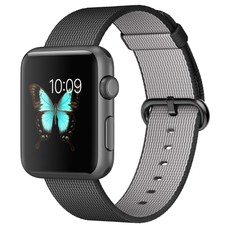
  • Apple Watch Sport 42mm Space Gray Aluminum Case Black Classic Buckle (MMFR2LL/A)

    • $499.00
    • Buy It Now
    • +$22.43 shipping
    • 1h left (Today 6:56AM)
    • From United States
    • Customs services and international tracking provided
    • See more like this
  • Tuesday, 6 September 2016

    iPhone 6

                                                                           iPhone 6


    The 2014 iPhone 6 has been superseded by the iPhone 6S and the new iPhone 7 is not far off the horizon.

    If you're looking at this review now the chances are you're considering buying a second-hand or refurbished iPhone 6 and want to know how it stacks up to the current model and to other competitors.

    While the iPhone 6 looks just like the 6S what's inside is totally different. The iPhone 6 is a little slower, battery life a little worse and the camera isn't quite as sharp as the newer model. It's also missing a couple of new features like the cool animated Live Photos and the pressure sensitive screen input called 3D Touch.

    While you're not missing a lot at the moment with 3D Touch, the lack of Live Photos on the iPhone 6 will be a shame for anyone who loves taking mobile snaps. The quality of the iPhone 6 camera is still decent by today's standards, but it's not as good as the camera on its successor.
    Currently prices for the iPhone 6 range from £430 for a brand new and unboxed 16GB model to £250 for something that has had a few knocks and scrapes and is network locked. I'd strongly recommend going for the 64GB version, however, which only costs a few notes more these days. This will provide you ample storage for music, apps and videos and so you won't have to keep deleting things just to have a little spare space.

    The other thing to consider is that battery life is affected the more a phone has been recharged. The iPhone 6 was never the longest-lasting phone so this could mean that you're reaching for the plug before the day is out. That's no fun at all and replacing the battery on an iPhone 6 is a very tricky task that requires special tools.

    So what are your other options? Well you could opt to go Android instead of iOS and Apple. Assuming you don't want to shell out major bucks on the likes of the Samsung Galaxy S7 or HTC 10 then the OnePlus 3 is a solid option. The problem with it is that the latter is quite a large phone, similar in size to the iPhone 6 Plus. There aren't many good smaller-screened Android phones we'd happily recommend, but Apple itself has a great little phone that might do the job.

    Rather than buying an iPhone 6 I'd recommend opting for the iPhone SE. This has the same design as the iPhone 5 and 5S so is smaller than the the iPhone 6, but in all other respects superior. It has all the same gubbins as the iPhone 6S but costs at lot less – just £359 for the 16GB model. I know I'd rather have a new iPhone SE under Apple's warranty and with all the latest features than a used iPhone 6.
    WHAT IS THE IPHONE 6?

    When it was released in 2014 the iPhone 6 was one of the hottest smartphone on the market.

    Featuring a completely rethought design, Apple loaded the iPhone 6 with a wealth of custom software and hardware features.

    The combination of hardware and software features made the iPhone 6 one of the most innovative and powerful smartphones ever seen.

    However, one year on Apple’s competitors have come out swinging releasing their own wave of top-end innovative handsets.

    Chief among these have been LG with its stellar G4 handset and Samsung with its Galaxy S6, Galaxy S6 Edge and Galaxy S6 Edge+ range of smartphones.

    Each featuring a similarly impressive array of custom technologies the phones have made many buyers justifiably question if the iPhone 6’s time in the sun has ended and they’d be better off waiting for Apple’s next iPhone.

    However, having used the iPhone 6 solidly since it’s launch, we’re happy to report even though it’s beginning to show its age, there is still plenty to like about Apple's 2014 flagship.


    IPHONE 6: DESIGN – APPLE'S ON TO A WINNER


    The iPhone 6 opts for soft curves and seamless joins between the screen and the back. It's a very different look from the iPhone 5S, which has shiny machined edges. Barring some plastic detailing on the rear it’s all glass and metal, and looks great for it.
    It’s not as striking as its predecessor. The angular design of the iPhone 5S made it stand out amore. It’s the same with the iPad mini and iPad Air, although they marry the diamond cut edges with rounded metal sides.

    It may not be as instantly arresting, but the iPhone 6 looks like it’s been hewn from a single piece of metal and glass and fused seamlessly together. The effect is particularly strong in the space grey finish and with the screen turned off. It is a beautiful slab of black glass and anodised aluminium. We feel the design is safe rather than ground-breaking, though. The white bezel on the silver version ruins the seamless effect a little – we’d go for space grey every time.
    As always with Apple’s phones the iPhone 6 has superb balance, it just feels right in your hand. The comfy edges are also a lot easier on the palm than the sharper ones on the iPhone 5S and the 6.9mm thickness makes it feel sleek yet strong.

    Some owners are claiming that it may not be quite as robust as Apple hopes. Reports of the iPhone 6 bending in pockets have surfaced. We’ve had it in the front pocket of jeans and have not experienced any issues for the months we've been using it or the iPhone 6 Plus. We're not talking super skinny jeans, but we've been cycling with it in tight pockets and there's not been a bend in sight. In fact since the initial furore we've heard very little about it. We've hear similar reports surfacing about the Samsung Galaxy S6 but unless you intend to use your iPhone 6 as a see-saw we wouldn't worry about it at all.

    We do suggest you fork out for a case, though. Like all phones you run the risk of smashing the screen if you drop it and iPhone 6 repairs don't come cheap. Check out our selection of the best iPhone 6 cases before you buy.
    It’s big, but not too big

    While the iPhone 6 is bigger, it doesn't feel too big. Aside from being much thinner and lighter at just 129g it’s very similar in size to the original HTC One, one of our favourite phones of 2013. If you have small hands you might struggle to get to the top corners of the screen, but we've not experienced these problems.
    There is some help if you do find the screen of the iPhone 6 too big. Clunky one-handed use features are available on some Android phones, but they’ve never felt particularly intuitive. They often just shrink the whole screen diagonally down. Apple has come up with a typically elegant solution. Tap twice on the home button and the entire top of the screen jumps down bringing all the hard to reach areas into your thumbs range. It works on every app that works in portrait mode too, so you can easily get to the address bar or a browser without a problem.Realising a power button at the top of the phone of this size doesn’t work Apple has moved it. The power button is at the right edge, above the nanoSIM tray. This makes it easy to access with your thumb, if you’re right -anded or with your index finger if you’re a lefty. It works a lot better than the top power button on the HTC One M8 which requires a little juggling to get to if you’re not ET.


  • New listing iPhone 6 Plus Gold 16GB (Unlocked)


    • $728.99
    • Buy It Now
    • +$24.65 shipping
    • Sep-06 13:37
    • From United States
    • Customs services and international tracking provided
    • See more like this

    iPad Pro

    If you're on the look-out for a new Apple tablet, then you'll probably be wondering whether to pony up for the huge iPad Pro 12.9 or keep things a little more compact with the 9.7-inch version. Both are great, but cater for very different audiences and come in at varying prices. Here we’ll compare the two and you can read our full, in-depth iPad Pro reviews.

    12.9-INCH IPAD PRO VS 9.7-INCH IPAD PRO: WHAT'S THE DIFFERENCE?

    Unlike the two sizes of iPhone 6S, which are almost identical, the iPad Pros have totally different screens and cameras, as well as some altered internal hardware. This means that there are very real reasons why you might want the smaller iPad Pro more than its big brother, aside from the size and price differences.While the 9.7-inch iPad Pro has a smaller and lower resolution screen it retains the same pixels per inch (PPI) of the 12.9-inch variant and that means it looks just as sharp. Screens aren't just about resolution and the small Pro has a fantastic LCD panel, probably the best we've ever seen on a tablet. For a start it has a huge colour gamut – that's the range of colours it can display. This means it can display a more varied range of colours than the bigger screen can, and it can do it more accurately too. That's great if you're a designer.

    The newer iPad Pro also comes with a great trick called True Tone. This adapts the colour-tone of the screen based on the ambient light around you. It makes reading in bed or lower light a lot more comfortable. If you're a designer and want perfect colours you can turn this off.

    The cameras are also much better on the smaller Pro. In fact it has the same front and rear facing cameras as the iPhone 6S. That makes it the best tablet to take photos on bar none. By comparison the 12.9-inch model is years behind.

    Finally there's the size to consider. I found the smaller iPad Pro a great deal easier to transport and to use when out and about, particularly on a plane where the large iPad Pro just wouldn't fit comfortably on the folding table.

    If it sounds like I'm recommending the 9.7-inch iPad Pro over the big one you'd be right, in most cases it's better and it's almost £200/$300 cheaper, but there are a few exceptions.

    The larger screen means a larger keyboard and the 12.9-inch version is a lot easier to type on. It's also a bigger canvas if you're using it as a graphics tablet with the Apple Pencil.

    There's also a little more grunt behind the big iPad Pro. It comes with 4GB instead of 2GB of RAM. In day to day use this doesn't seem to make much difference, but if you like to work with large AUTOCAD files or do lots of video editing on the go this could save you time.

    To read about the smaller iPad Pro click here or read on for the 12.9-inch model.

    WHAT IS THE IPAD PRO?

    The iPad has been more successful than Apple could have hoped for.

    Sure, the company was aware that its handsome slab of glass was going to be the perfect platform on which to bring folk closer to content – be that web browsing, watching videos or casual gaming. What it may not have foreseen, though, is the slew of third-party peripherals and apps that have been designed to extend its functionality beyond solely a "play thing" into a workhorse too.

    Enter the iPad Pro, the daddy of all iPads thanks to an enormous 12.9-inch screen. More than two inches bigger than the iPad Air 2 – and five more than the iPad mini 4 – the iPad Pro provides around 80% more viewing area when compared to its 9.7-inch counterpart.

    The iPad Pro is bigger than all iPads that have gone before it – although incredibly, this increase in size is delivered in a package that's only 33g heavier than the first version released back in 2010.

    Every other feature of note receives a boost too. The screen has a higher resolution, there’s a brand-new A9X processor and 4GB of RAM. Apple claims the iPad Pro is faster than 80% of portable PCs shipped last year, and while I'd take that declaration with a pinch of salt, it may not be too far off the mark. The reason being that the vast majority of laptops sold tend to be cheap and cheerful – particularly with the advent of the Chromebook.
    The real question is, does it have what it takes to be the laptop replacement that closest rival, the Microsoft Surface Pro 4, is aiming to deliver? Would you rather have a iPad Pro in your bag than a MacBook or Dell XPS 13?

    For some, the answer is yes. The iPad Pro is a stylish, powerful tablet that, when combined with a keyboard and Apple Pencil, has the ability to stand toe-to-toe with traditional laptops – despite running a mobile operating system in iOS 9.

    Those accessories are key, though. Without them, the iPad Pro is just an oversized tablet – great for entertainment and consuming web content, but not much else. Unfortunately, as with most things Apple, neither come cheap. The keyboard costs £139/$169, while the less essential Pencil will set you back a hefty £79/$99. Add this to the £679/$799 cost of the basic 32GB Wi-Fi-only model, and you're looking at a considerable dent in your wallet.
    IPAD PRO – DESIGN

    Holding the iPad Pro makes you feel like a little kid, especially if you normally use an iPad mini. There’s just so much of it.

    In all other respects, the iPad Pro is identical to the smaller tablets in the range. You get the excellent Touch ID fingerprint scanner built into the home button, a power button and volume controls.

    Aside from the Lightning port for charging and connecting to a computer, and a front and rear-facing camera, that’s about it. Like all of Apple’s tablets, the iPad Pro is a simple proposition regardless of its "professional" moniker.

    Like all other tablets in its range, the iPad Pro is also super-model thin, just 6.9mm to be precise.

    So even though it’s light and slim, its sheer size means you won’t be comfortable using the iPad Pro with only one hand. In fact, it’s a handful even when using two.
    This is where the Smart Keyboard becomes handy. It connects via three small magnetic points on the left side of the device, which allow for both data and power to transfer. As a result, it doesn’t require a Bluetooth connection or charging.


    IPAD PRO SMART KEYBOARD COVER

    Thin keyboards for tablets have come on leaps and bounds, with the Microsoft Surface keyboard being among the best. The iPad Pro’s unit is almost as good – except that it doesn’t include a touchpad; you need to use the screen. A lot.
    Covered in a tough fabric, which makes it robust and water-resistant, it also serves as a screen cover for the iPad Pro.

    It comes with a full Qwerty keyboard, with low-profile keys that help retain the iPad Pro's overall slenderness. There’s still adequate travel for you to know that you’ve hit a key, and they're large enough and spread enough to make accurate typing a doddle.

    Unlike the latest Microsoft Surface tablets, which feature adjustable kickstands, the iPad Pro has only one screen angle. It’s good for typing, but is a little too laid back for my liking when placed on a bedside table. I found myself having to use a small book to prop up the rear and bring the screen a little further forward for some late-night Netflix binging.
    Where the iPad Pro trumps the Surface is with stability. It provides a solid foundation whether used on a table or, crucially, on your lap. In fact, I found that typing with the iPad Pro on my lap was more comfortable than using my laptop, primarily because my thighs didn't get singed by the hot components, nor did the fans get blocked by my jeans.

    Keyboard shortcuts work too, but only for apps that support them. All of Apple’s native apps – Pages, Notes, Numbers and Keynote – are good to go; Google Docs isn’t. Shortcuts do appear at the bottom of the screen close to your fingers, which helps, but this isn't ideal. App developers will catch up, but at the moment shortcuts aren’t quite the benefit they could be.

    It’s the same story with video apps. I found myself regularly whacking the spacebar to pause videos on YouTube only to realise that I wasn't using a Windows 10 laptop. Touch the screen it is, then.

    Apple's keyboard isn't the only version out there for the iPad Pro.
    Logitech, too, has released the backlit CREATE keyboard that covers the iPad Pro entirely. Slightly cheaper and a lot chunkier than the Smart Keyboard, it makes the iPad Pro look and feel far more like a full-sized laptop, especially since the keys have more travel.

    It also comes with handy shortcuts for switching apps, adjusting volume and brightness, and positions the iPad Pro a little straighter. It’s the keyboard I’d choose to pair with the Apple’s giant tablet.

    The iPad Pro comes close to emulating the form and function of a laptop, but it isn't quite a replacement. If, like me, you spend much of your day typing then you'll miss a trackpad and screen pointer for editing.
    IPAD PRO – APPLE PENCIL

    The Apple Pencil acts like a trackpad to some extent. It isn’t like the digitiser styli found on Wacom graphics tablets or the Galaxy Note 5. It’s a far simpler proposition, but still has a bunch of sensors for some nifty features.

    There's far fewer pressure sensitivity levels when compared to the 1,000+ offered by Wacom. Still, if you like to sketch or write by hand then it’s a useful addition to the iPad Pro.
    Although it isn't as sensitive, the Apple Pencil is super-responsive. There’s no annoying lag that I’ve experienced with other devices.

    It comes with a few tricks up its sleeves, too, thanks to the sensors in the Pencil. Hold it at an angle and it can be used to shade or colour in, just like a normal pencil. I used it successfully to quickly sketch out plans for new kitchen cupboards, so that a carpenter could provide a quote.

    The Apple pencil will be a boon for those wanting additional precision for editing presentations or making tweaks to a CAD or Photoshop file.

    There already quite a few apps out there that support the Pencil, but some don’t yet use all of its functionality. Paper 53 and SketchBook are ones that do.
    Where I believe a keyboard is an essential part of the iPad Pro experience, this isn't true of the Pencil. Yes, it’s neat, but it doesn’t provide the level of sophistication an artist will want, nor does iOS have the apps and shortcuts that a graphic designer craves.

    Adobe has created a range of apps for the iPad Pro but these are much lighter than, say, Photoshop or InDesign. The keyboard shortcuts you’ll be so used to in those apps don’t transfer to the iPad Pro’s counterparts, either.

    The Pencil combined with the iPad Pro is for people who want to touch up, tweak and dabble with design and photo editing, rather than professional graphic designers who make a living from it.

    Finally, the lack of any sort of holder for the Apple Pencil is a real pain. Over the past week, I’ve misplaced it or found it lurking in a fold of my bag following much rummaging. Why Apple didn't design the Smart Keyboard to accommodate it, I don't know.
    IPAD PRO – SCREEN

    12.9-inch Retina display; 2,732 x 2,048 resolution 264ppi; oxide TFT layer; Variable refresh rate

    The 12.9-inch Retina screen, alongside the 5.6 million pixels it packs, make this the biggest and most high-resolution iPad screen ever made.

    Not only that; Apple has used what it's learnt from building the great screen on 2015’s 5K iMac and applied it here. The iPad Pro uses a similar oxide thin-film transistor (TFT) to the 27-inch desktop, as a result delivering uniform brightness across the screen. There's none of the patchiness you're likely to see on tablets such as the Amazon Kindle HDX 8.9 here.
    The oxide TFT has another benefit: for the first time, it has enabled Apple to add a variable refresh rate to an iPad. When you’re flicking through photos in your library, for example, or reading an article on the web, the refresh rate is halved from 60Hz to 30Hz. This leads to greater power efficiency and therefore a longer battery life for the iPad Pro.

    Quite how much battery is saved with this feature I’m not certain, but every little helps – especially with a screen of this size on a portable device.

    The advantage of all this tech is a screen that's simply stunning, in terms of colour accuracy, uniformity and peak brightness. Move the slider all the way to the right and the iPad Pro is almost too intense. Much of the time, a level of 60% was about right, moving up to 80%-100% when it’s sunny outside. Note that the glossy screen is reflective, especially when used outdoors during the day.
    While there's a faint reddish tinge to whites, it’s less pronounced than seen on previous iPads. Both photos and videos look superb and are packed full of detail. There’s a naturalness to the iPad Pro’s screen that’s hard to find elsewhere.

    Contrast levels are good, too, but they don’t reach the levels of Samsung’s AMOLED displays on devices such as the Galaxy Tab S 10.5. Still, dark scenes in movies have plenty of nuance and depth.

    When Smaug attacks Laketown in The Hobbit: Battle of the Five Armies, both the vibrant flames and night scenes look immense on the pixel-packed screen.The iPad Pro may be geared towards work, but it’s great for entertainment too.


  • New listing NEW IN SEALED BOX Apple iPad Pro 128GB, Wi-Fi, 12.9in - Space Gray (ML0N2LL/A)

    • $810.00
    • Buy It Now
    • Shipping not specified
    • Sep-06 10:47
    • From United States
    See more like this
  • Saturday, 3 September 2016

    iPhone SE (part2)

                                         iphone SE is good        


    We knew practically everything there was to know heading into Monday’s big Apple event, but there were still a couple of surprises — and one of them was pretty huge. In 2015, Apple sold 30 million new iPhones that had 4-inch screens. 30 million! There are some smartphone vendors that don’t even ship 30 million total units in a year, and yet Apple’s old 4-inch iPhone models are still selling like hotcakes in many regions.

    That stat alone makes the iPhone SE a bigger deal than many people thought it would be, but the phone’s appeal extends well beyond that. In fact, the new iPhone SE is a shockingly good phone, and we’ll run down the five best (and two worst) things about it right now.
    Size
    We now know beyond a shadow of a doubt that there are still plenty of people who want smaller iPhones.

    The lower price is certainly a draw as well, but many people simply don’t want a bigger phone. The iPhone SE fits comfortably in just about any small or average-sized hand. It’s a tried and true design, and the display is still stunning despite being so compact.

    Size is also what sets the new iPhone SE apart from the rest of Apple’s lineup as well as most Android phones. Even affordable mid-range Android handsets are fairly large these days.

    Power
    This is key. Early rumors suggested the iPhone SE might be a somewhat minor upgrade compared to the iPhone 5s it would replace. More recent reports leading up to the event stated it would have many of the same internal components of the iPhone 6s though, and that ended up being the case.

    Put plainly, the iPhone SE is far too powerful and capable a smartphone to also be so affordable. Once released, it will be the best value in the world and people no longer have an excuse to buy a mid-range Android phone.

    Camera
    All those internal components from the iPhone 6s also include the camera from Apple’s latest 4.7-inch smartphone. It might not be the best camera in the world, but it’s pretty darn close and it’s now available in Apple’s most affordable new smartphone ever.

    Users shopping in this price range don’t have a single other option that comes anywhere close to matching the camera on the iPhone SE. Not one.

    iOS
    The iPhone SE has something else that other comparably priced mid-range smartphones don’t have: iOS and the surrounding app ecosystem.

    I really want to ditch my iPhone and switch to the Galaxy S7, but there’s no way I can leave iOS at this point. It’s just too good. The third-party apps are better, the overall user experience is better, and now it’s all available in a surprisingly powerful but compact package at a shockingly low price point.

    And about that price point…


    Price
    $399? That’s an incredibly low price for such a solid new phone. The base price will be a bit higher in some markets, but Apple obviously did its homework and made sure to price the new iPhone SE within reach of the customers it hopes to address.

    Worst things
    Nothing is perfect and there are plenty of things people will gripe about on the iPhone SE. For me, two things in particular stand out.

    First, Apple took all these great new components from the iPhone 6s but it kept the old Touch ID sensor from iPhone 5s. The company built such a phenomenal overall experience with the SE, and having the lightning-fast new Touch ID scanner would have really helped to keep everything on that high level. The sensor from the iPhone 5s is still faster than some other options and Apple likely tried to cut costs here, but it won’t deliver the same great experience as the iPhone 6s.

    And lastly, the design.

    The iPhone 5 was a great phone in 2012, and the iPhone 5s has been doing well for the past few years since its introduction in 2013. But wouldn’t Apple have attracted even more new buyers if the SE featured a fresh new design?

    Sticking with the iPhone 5’s design makes sense in some ways and it certainly helped Apple keep its R&D and production costs low, but it will definitely be disappointing to some potential customers. In fact, it might be the biggest mistake Apple make with the iPhone SE.

    please leave you'r comment!

    Bad things about jailbreak

    When the U.S. Copyright Office ruled recently that jailbreaking did not violate federal copyright law, a cottage industry of jailbreaking applications immediately popped up across the Web. Although jailbreaking was common before, the ruling has set the stage for far more companies and individuals to find ways around Apple's iOS and allow users to potentially get more from their smartphones.
    But the more consumers get out of their phones, the worse it might be. As nice as it might sound to get beyond Apple's restrictions, those rules are partially in place to protect users. Since the jailbreaking community has so far delivered few apps that justify going through the risky process, it seems that, at this point, doing so makes little sense. Here's why jailbreaking the iPhone is a bad idea.
    1. There are security concerns. The most obvious reason not to jailbreak the iPhone is security. As soon as a user jailbreaks the device, they're putting themselves in undue risk. In fact, it's estimated by some security experts that a jailbroken iPhone loses the majority of its security features. And considering that users store sensitive information on their iPhones, knowing that they could put all that data in danger just to jailbreak an already nice phone should be enough to make them stay away.
    2. The benefits are limited. The real value of jailbreaking an iPhone is hard to judge. For some users, the act of jailbreaking is a way to fight back against Apple and other technology companies that supposedly "lock" users into a device and mobile carrier package. For others, it's the promise of something better. The only issue is that there isn't much to like once the jailbreaking is complete. In essence, the user has a device that works just as it did before without some of the old restrictions placed upon it. And once owners start using the jailbroken device, they quickly find out that it provides the same experience with different apps. In other words, it's not all that great. And it really isn't worth it.
    3. One can only hope nothing goes wrong. When jailbreaking an iPhone, there is a risk of losing data or turning it into a useless brick. Realizing that, users are taking quite a risk when they decide to jailbreak the device. The process could go easily and take just a few minutes, but it might also go horribly wrong. And in a worst case scenario, the user may have to buy a new iPhone. Jailbreaking might sound like a great idea at first, but things can quickly go awry when a user decides to jailbreak a smartphone. And that must be kept in mind.
    4. You don't want to get cut off from OS updates. Whenever Apple updates its operating system, those who jailbreak the device are left out in the cold. As soon as the user plugs their jailbroken iPhone into their computer to download new software, Apple closes the operating system and installs the new update. That means that if a user wants a new version of Apple's software, but still wants to maintain all the jailbroken features, they're out of luck. Apple doesn't want users to jailbreak its smartphones. And it does everything it can with each new update to stop that. So, if an update is really important to a user, it's probably best not to jailbreak the smartphone in the first place.
    5. Novice users should stay away. Some users are more capable of jailbreaking a device and getting it to work properly than others. Realizing that, it's best for novice users to stay far away from iPhone jailbreaking solutions. Although it might sound exciting to break free from Apple's grips, there is a real risk involved with jailbreaking a smartphone. And if a user doesn't have the requisite knowledge and understanding of what needs to be done to achieve that, it's best if they don't do it.


    6. It's not about Apple's control. In the jailbreaking community, there is much debate over why Apple doesn't want users to jailbreak the iPhone. Most say that it's simply Apple trying to control its operating system and keeping its users within its grasps. But there is much more to Apple's desire than that. Apple is deeply concerned with the security issues that potentially plague a jailbroken operating system. Despite its hurting the user more than anyone else, it could have a negative impact on the iPhone ecosystem, and that's something that Apple doesn't want to see happen. Plus, jailbreaking gives hackers an upper hand, thanks to the ability to dig inside iOS. Those who insist on jailbreaking should at least do it for the right reasons.
    7. The apps aren't worth it. The main reason iPhone owners jailbreak their smartphone is to get access to those applications that haven't made their way to the App Store. Unfortunately, most of those applications pale in comparison to those already available in Apple's App Store. When Apple offered the App Store, it made it too profitable for developers to want to create applications for the jailbreaking community. Now, most solid titles are available in Apple's App Store, rather than to those who jailbreak their smartphones. It's something that iPhone owners should consider before they decide to jailbreak their smartphone.
    8. Other options are available. If users want to jailbreak their iPhones because they're unhappy with what the device offers, it might be time to consider an alternative device. Jailbreaking might afford users the opportunity to continue using an iPhone, but given the success of Android, switching to the Droid X or another device might be a better idea. Not only does it deliver a different smartphone experience, but it gives users a set of new applications to try out. And the best part is, switching to Android doesn't create the security problems that arise when jailbreaking an iPhone.
    9. iOS 4 is a must-have. Although there have been some fine reasons to jailbreak the iPhone in the past, with the release of iOS 4, it's becoming less and less appealing. The latest iPhone software boasts many of the features users have been waiting for, including multitasking, and it generally delivers a far better experience than previous versions of the operating system. In other words, it leaves little to be desired. iOS 4 might not have every bell and whistle that consumers want, but it has enough to justify keeping the software closed down.
    10. The timing is bad. Now that the U.S. government has said that jailbreaking an iPhone is just fine, malicious hackers will be focusing their efforts on iPhone customers more than ever. After all, prior to the ruling, just a small percentage of iPhone owners were actually jailbreaking their devices and most of them were advanced users. Today, just about anyone can do it, and hackers will have more vulnerable targets from which to choose. Now is just not a good time to jailbreak the iPhone. A few years ago, the risks would be low. Today, they're increasing by the day.

    please leave you'r comment!

    Friday, 26 August 2016

    iPhone 5

                       WHAT DO IPHONE 5 OWNERS THINK?

    A number of high profile news stories emerged soon after the iPhone 5’s release. These ranged from the metallic back and side chipping and revealing the aluminium beneath to issues with battery life and the Apple Maps fiasco. We go into more detail about the maps app further on.
    The most complained about aspect of the iPhone 5 is battery life. More than 2,500 owners gave the iPhone 5 an average of 6.8/10 for battery life. The Galaxy S3 and S4 score 7.3 and 7.6 out of 10 respectively.
    The next aspect of the iPhone 5 that most irks owners is its value for money. iPhone owners have known for a long time that Apple demands a premium for its phones. The cost of extra storage on an iPhone makes it particularly costly to go for a 32GB or 64GB model, whereas Galaxy owners are able to add extra storage on the cheap via the microSD card.
    However, it’s not all bad news for iPhone owners in terms of value. The iPhone 5 retains its value better than any other smartphone. This means you can get back a lot of the original outlay by selling when you upgrade. Even better news is that the 2,500 owners who provided feedback scored the iPhone 5 with 9.2 for ease of use, 9.1 for features and 9.1 for design, clearly showing that it also has a lot going for it.
    Now let's get to the nitty gritty of what the iPhone 5 is really like.

    INTRODUCTION

    Updated: Now with thoughts on how well the phone's design ages, iOS 6.1 and GoogleMaps.
    The iPhone 5, like all iPhones before it, is an evolution rather than a revolution but it’s at least on the surface the biggest evolution we’ve seen for years with a new design, a larger screen size and superfast 4G connectivity. But, with a high price and the usual Apple-restrictions, is it enough of a leap to outpace the likes of the Samsung Galaxy S3LG Optimus 4X HD or the Nokia Lumia 920? With several months of use now under our belt, it's high time to find out, for a second time.

    IPHONE 5 - DESIGN

    As ever, we'll kick off with the phone's design and external features. When the phone first arrived, we proclaimed it "the most beautiful and best built phone on the market", and for the most part that still holds up. It remains the case that no other device comes close to matching the fit and finish Apple has achieved on the iPhone 5.
    It all kicks off with the etched aluminium back. Gone are the glass back and steel sides of old to be replaced with a single piece of aluminium that’s hewn to form the back and sides. This is etched on the back and sides to create a matt look. As well as looking great it also makes the phone easier to grip and keeps it from slipping quite so easily – the iPhone 4/4S had a remarkable ability to slide off even the flattest looking surface.


    Contrasting nicely with the matt back and sides are the shiny diamond cut bevelled edges, glass front and glass inserts on the back. These angled edges make the iPhone 5 a bit more comfortable to hold compared to the very square ones on the iPhone 4S, which is definitely a welcome tweak.
    However, not all is well. Very early on there were complaints that the black version chipped quite easily, showing the shiny metal beneath, and this has proved to be such a common issue that we'd stongly advise opting for the white version instead. That said, our white version is also looking surprisingly battered after only four months use. The whole back and sides are peppered with small dings and scratches that are surprisingly noticeable.
    The main problem areas are the shiny bevelled edges and the Apple logo on the back, where any scratch is immediately noticeable against the pure shiny surface. And while we haven't kept the phone in a case it has always been confined to an otherwise empty pocket. As has a two year old iPhone 4 that remains looking near flawless - see below.


    Frankly, compared to the glass and steel build of the iPhone 4 and 4S, the iPhone 5 is a signiifacnt step backwards in terms of durability. Sure, the glass back is slippery but it's demonstrably tougher too, and perhaps it could've been etched or something to make it less slippery. Hammering home the point are the black or white little glass inserts on the back of the iPhone 5 which, months on, are spotless. Obviously, if you're particularly careful and use a case the iPhone 5 will stay pristine for longer but it's nonetheless a concern.
    All that said, the iPhone 4/4s are somewhat of the exception that proves the rule with most shiny plastic and anodised aluminium competitors suffering just as much from scratches. In fact it only goes to justify our recent complaints about the Nokia Lumia 920 having mostly shiny rather than matt plastic finishes while the HTC One S is another famoursly flawed anodised example.
    Pick the iPhone 5 up and it's noticeably thinner and lighter than the iPhone 4S, despite packing in a larger 4-inch screen. Specifically the iPhone 5 is 20 percent lighter (112g compared to 140g) and 18 percent thinner (123.8 x 58.6 x 7.6mm compared to 115.2 x 58.6 x 9.3mm). This makes a surprising difference when you actually handle and compare the two devices, with the iPhone 5 almost feeling a bit too light at first, compared to the reassuring solidity of the 4S. This impression soon fades, though, as you realise it is still a very well built phone.
    With the iPhone 5 screen size having increased the big concern would be that the whole phone becomes cumbersome to use but Apple has avoided this by only increasing the height of the screen, upping it by about 12mm. This small increase makes minimal difference to the usability of the phone, with you still able to reach the full expanse of the screen easily enough.

    Apple has moved from a now fairly standard microSIM to an even smaller nanoSIM, so if you’re buying the phone without a contract/SIM you’ll need to contact your network to get a new SIM or get the scissors out. You should be able to chop down most newer SIMs as the layout of the contacts is the same.
    Other changes include the headphone jack which has now moved from the top edge down to the bottom. Having it here does make some theoretical sense as when held in the hand the headphone cable hangs straight down out the way and when you go to put the phone into your pocket you don't have to change your grip to do so - give it a go and you'll see what we mean. However with long term use we've generally found it to be a bit annoying, getting in the way of your hand when using the phone. It's not a major concern but neither is it really a step forward
    Alongside the headphone jack are newly designed microphone and speaker grills and of course the new Lightning dock connection. The former are now covered by small drilled holes, rather than one large opening, while the latter is a replacement for the wide, 30-pin dock connector of old.
    The new connector will carry audio, HD video, data and of course charge the phone, with adapters available to convert the signal to just about any other type of connection you could name. Lightning is also reversible so you don’t need to worry about which way round you’re plugging it in, and it's a sturdier plug too
    Concerns about having to buy new adapters to fit existing docks and chargers remain, as does the fact that Apple didn't simply opt for microUSB like every other phone, but there is no doubting it is a better connection than the old one, which is something we suppose.
    An adapter is available that converts the new connector to the old one but one is not included in the box. You get just the new USB cable, UK plug and the SIM removal tool. The adapter will set you back an insultingly hefty £25.

    To comply with EU regulations that stipulate microUSB must be used as the standard connection for all new phones, Apple does offer a Lightning to microUSB adapter too, but it again costs a rather grimace-inducing £15.
    Getting back to the phone itself, the final pieces of the puzzle are the cameras. The rear one retains the same core specs as the iPhone 4S but it’s 30 percent thinner, to allow the phone’s overall thickness to come down. As for the front facing one, it now sits above the earpiece rather than off to the side, and it can shoot 720p video, up from 480p.
    All told then, as a piece of industrial design, the iPhone 5 looks like a triumph, though with long term use it has been shown to have a number of drawbacks such as the scratching and headphone position. But overall there's still a lot to like and still no other phone matches it for that initial wow factor. But what of that new screenTaking a closer look at the iPhone 5’s larger screen, Apple has finally responded to the popularity of larger and larger rival handsets such as the Samsung Galaxy S3 and LG Optimus 4X HD. But, instead of leaping up to an enormous 4.7 or 4.8in screen it has simply made the existing one a bit taller.
    The result is a phone that still fits comfortably in the hand but which can fit an extra row of icons on screen and is better suited to watching video thanks to its 16:9 aspect ratio. There is still a noticeable step up in size and visual impact going for those even larger phones but equally there’s enough of an improvement here that you’d be reasonably happy to watch a full movie while out and about, whereas on the 4S is was a bit too cramped.
    In terms of pixels, you still get the same pixel density of 320ppi as the iPhone 4/4S but here 176 more rows of pixels have been added to fill the extra height. As such it’s still an incredibly sharp display that’s superb for reading fine text and picking out tiny details in images. That said, the total resolution is still a step behind that on its big screen rivals which offer 720 x 1280 pixels for a total pixel count of 921,600 compared to the iPhone 5’s 727,040.


    The quality of the screen, though, is class-leading. Apple has joined many other rivals in removing a layer from the screen production process, with the LCD display now built right onto the front pane of glass. The result is that painted-on effect that modern phone have where it literally looks like you could touch the image. It also results in astonishingly good viewing angles, plus Apple has increased colour saturation by 44 percent and the display now uses the sRGB colour gamut - the colour standard used by most other computing devices - for more accurate colours. It really is superb.

    please leave you'r comment!


  • $229.99Prime
    Get it by Thursday, Sep 8
    FREE Shipping on eligible orders
    Product Description
    ... This Brand New iphone 5 16GB White phone comes in Original box from ...