Apple Watch
I’ve been wearing Apple’s first wearable since it hit shelves last spring and in most ways my opinion almost entirely mirrors our initial review. Once you’ve looked past the typically stylish Apple design, the Watch is an overly complicated piece of tech that still doesn’t really know what it wants to be.
In fact, the best move I’ve made so far is to completely turn off all notifications. The constant wrist vibrations became a nuisance, not aid, on too many occasions. Silencing them is the only reason I’ve been able to keep the Watch on this long. Maybe smartwatches aren’t meant to be hubs for all our communications after all.
Even though watchOS 2 was meant to sort out the ridiculously slow app situation with native downloads, it’s still far from perfect. Apps still take an age to get going and they’re still mostly pointless. Aside from the handy music controls and fairly impressive Citymapper there isn’t much else that has made me think, ‘Wow, this really works on a watch.’
WatchOS 2 did bring with it a few neat upgrades. The Nightclock feature is nice to have, though I wish I could keep it on all the time, like I can on the Moto 360 2. And don’t even try using it with the Milanese Loop strap, you need a tough one like the Sport Band to keep it upright.
Time Travel, which lets you skip through the day by twiddling the Digital Crown, is great too. If you’re using some of new third-party complications it’ll show you when rain might be coming (through Dark Sky) and upcoming appointments.
First generation Apple products are always more for the tech enthusiasts than the everyday consumer – remember the ridiculously expensive original iPhone or the almost useless first-gen iPad?
So the thought of the Apple Watch Series 2 does still make me somewhat excited. But, it’s really the software that needs the biggest update and there are some big improvements expected from watchOS 3. It needs to be simpler, with less to do and a generally cleaner way of doing everything.
Apple may not be the first technology company to release a smartwatch, however, it is debatably the first to generate any significant interest about a wearable.
In fact, recent stats from Strategy Analytics suggest the Apple Watch already accounts for 75.5% of the smartwatch market.
This is despite the fact Google made its opening move to conquer the smartwatch market over a year ago, when it released its wearable focused Android Wear operating system.
However, while it may be enjoying early success there are quite a few niggling flaws in the Apple Watch that potential buyers should be aware of. These include common issues, such as poor battery life, as well as more local problems, like weird software glitches and unintuitive app interfaces.
APPLE WATCH – DESIGN AND COMFORT
The Apple Watch is the most attractive smartwatch by a country mile. It uses the most luxurious materials and it’s more discreet and elegant than the majority of its rivals. That’s the least we expected from Apple and from something that costs more than the alternatives, though.
The casing, which is made from stainless steel, has a lovely polished sheen, while ceramic glass protects the heart rate sensor on the back. The Watch is beautifully constructed, though the Watch complements a smart shirt better than something more casual. Much of this comes down to the version and strap you choose, though, which we’ll get into in a minute

First, an important question – it’s a beautiful smartwatch, but is it a beautiful watch in the traditional sense? Not really. A normal £600 watch doesn’t have to live with the compromises that most smartwatches, including the Watch, have to deal with and that shows. Pick up a similarly priced Nixon, a Seiko or Hamilton watch and you’ll instantly see what we’re talking about.
Apple does live with those compromises better than most, though, specifically that issue of thickness. The Apple Watch isn’t thin. It’s about as thick as three British one pound coins (11.5mm thick to be precise), but you don’t notice the added bulk as much as some. The way the stainless steel case and screen curve inwards help create the illusion of a slimmer, more elegant timepiece compared to the Moto 360, which many feel is the most desirable Android Wear watch to date. It also helps that the Digital Crown and Friends button on the right don’t jut out too far, while you’ll barely notice the speaker and mic on the left that let you make and take calls.
That thick body fits in an array of components, including 8GB of flash memory, the NFC radios ready for Apple Pay (US-only for now), sensors for tracking motion and Apple’s custom S1 processor. That’s accompanied by 512MB RAM and the whole chipset setup is supposedly more powerful than the first generation iPad.
So far, so good, but it’s a little disappointing that the Apple Watch isn’t really waterproof. You’ll have to take it off before you get in the shower and don’t even think about going anywhere near a swimming pool. Apple says it meets the IPX7 water resistant certification, which means it’s suitable for running in the rain and doing the dishes with it on.
There’s no shortage of strap options. Apple is offering a variety of leather, metal and more sport-friendly rugged straps with different types of buckles. It’s easy to remove and change them by locating and holding down the buttons on the back of the case to slide out the watch strap.
We had the Milanese loop strap, which is the most jewellery-like in appearance. It complements the stainless steel body nicely, but it’s a little more feminine than the leather options. Unclip it and wear it around your wrist and you’ll see what we mean. Its magnetic clasp makes it easy to secure and means there’s no need to remove links to find that perfect fit. It’s not free from issues, though. The clasp has already picked up a fair few scratches, so it’s clearly not the most durable strap in the range.
It is very comfortable, though, as is the Watch as a whole – it feels fine even when worn all day and night. It’s technically a little heavier than other smartwatches, but you’ll barely notice the extra weight. Thankfully, it’s elegant stature means it doesn’t stick out like a sore thumb and we’ve had no skin irritation issues during our time using it.
APPLE WATCH – SCREEN
If there’s something smartwatch manufacturers are not struggling with, it’s how to make great small screens. LG and Samsung lead the way, but that’s no surprise when they’ve been excelling doing the same for phones and TVs for some time now.
The Watch we tested with the 42mm strap packs a 1.7-inch rectangular screen, which is bigger than the one used on the Watch with the smaller 38mm strap (1.5-inch). Apple is calling it a Retina Display, but unlike an iPhone, it’s swapped LCD technology for an LG-built flexible OLED one.
On top lies a sapphire crystal coating, something you’d find on a similarly priced Nixon watch for instance. This is included to protect against scratches. It’s also meant to increase reflectivity, but that’s not something you’ll find an issue with on the Watch. The cheap Watch Sport has to settle for toughened glass.
From a design perspective, the Watch screen is a beauty. There’s no obvious thick, ugly screen bezel, so all of that screen estate is dedicated to accommodating the operating system. Apple has hidden away the ambient light sensor – responsible for automatically dimming brightness – behind the screen, which is rather clever.
The rectangular versus circular screen debate continues to divide and we’d still side with the more traditional approach. But the Apple Watch is the most convincing argument for a ‘smartphone inspired’ screen on a phone.
The 1.7-inch screen has 322 pixels per inch and it’s right up there with the Samsung Gear Live for sharpness, colour accuracy and brightness. Whites have a slight blueish tint, but it’s virtually impossible to notice on such a small screen. Visibility is fantastic, as well. Day or night, you won't have to squint to read it and it copes well in bright sunlight.
Another aspect of the screen is Force Touch – it’s one of the most interesting features on the Watch. It essentially forms part of the screen technology and makes it possible to detect the difference between light and hard presses on the screen. There’s nothing really like it on other smartwatches and while it takes some playing around to work out the apps compatible with it, it’s a clever way to add extra functionality to apps without having to over complicate the user interface or add more physical buttons.
We’d say Samsung’s smartwatch screens remain the pinnacle, but Apple’s not too far behind for overall quality.
APPLE WATCH – SOFTWARE & USING THE WATCH
So Apple has more or less nailed the hardware. The Apple Watch looks good, has a great screen and is very comfortable. It will live and die on its software, though, and the Apple Watch feels like a first generation product. Apple, rightly or wrongly, has a reputation for easy to use software, but the Apple Watch isn’t easy to use.
Even the setup is rather fussy. It takes a good 25-30 minutes to setup the Watch and its companion app so you can start using it – it’s trivial in the greater scheme of things, but also frustrating. Needless to say, the Apple Watch only works with iPhones, specifically the iPhone 5S and upwards, so iPhone 5 and 5C owners are out of luck.
Once setup, there’s no escaping the feeling the Apple Watch is clunky and unintuitive. You’ll accidentally swipe a screen when you can’t or press the Friends button instead of the crown for a while. The relationship between iPhone and Watch adds to the confusion as well. It’s all a little bit chaotic. It’s a steeper learning curve than Android Wear, which definitely has its own software issues to resolve.
It starts out in a familiar way. There’s a drop down notification bar and a Control Center you can view from swiping up on the touchscreen. But the app homescreen is completely different – it’s looks a bit like a level from Bubble Bobble with all of its floating app icon bubbles. These can be rearranged from the Apple Watch phone app.
Digital Crown & Taptic Engine
Key to navigating this interface is the Digital Crown – a modern take on the traditional crown and a unique approach compared to Android Wear alternative. This means navigation isn’t based on the touchscreen alone. It's main and most useful function is twisting to zoom into a map or scroll through a text message, as using the crown won’t obscure what you’re looking at. You can push to jump to the app home screen or hold down to activate Siri.
It isn’t as revolutionary Apple makes out, but the Digital Crown does work really well. The only troublesome application of the crown is when you need to zoom into apps on the app homescreen. Trying to be very precise when there’s a lot of apps on the homescreen can be very tricky. As you add more apps it gets harder and more fiddly to pick the right one. You can use the crown to zoom, but trying to select an app in the zoomed out in view is frustrating.
Something we don’t have a problem with is Apple’s Taptic Engine. Android Wear watches and activity trackers use similar technology to give you a nudge when you haven’t moved around for a while. Apple uses the technology in a similar way, but also has some unique uses for it like helping to guide you in the right direction when using navigation. When you need to turn right, it’ll send a gentle purring vibration on the right of the screen. It's a clever feature that's very effective.
Siri & Voice Control
Like Android Wear, voice control plays an important role for Apple’s smartwatch. It doesn’t feel as overbearing as it is on Android Wear, but it does offer an easier way to get the information you need, which is essential when you’ve got such a small screen to play with.
It does many of the things the digital assistant can do on the iPhone. Pressing and holding the digital crown activates Siri where you can ask it about the weather, get it to search for items, or push you straight through to apps.
From a reliability point of view, it does have its bad moments. If you keep the requests simple, it’s fine. As soon as you get a little more complex, it begins to have problems. The mic sensitivity means that if several people around you are talking, it can have a tendency to pick their voices up too. It can also be a little slow to analyse requests that you’ll end up repeating and it’ll pick up the repeated request as well.
Glances, Friends & Messaging
The next big software feature is Glances. This is a stream of widgets pulled in from downloaded Watch apps. These can be turned on within the Apple Watch app. You can view Glances by swiping up from the bottom of the screen.
Twitter is one of the first apps to support Glances, condensing activity into top trends. If you want to explore more than what’s popular at the moment, you can launch full Watch app with a simple press. The ECB cricket app’s Glance support works well, pulling in latest scores, while the Shazam integration is well suited to quickly recognize a song. It would have made more sense adding additional homescreens for homescreens instead of breaking it away from the main user interface, but it’s definitely one of the Apple Watch software features that shows great potential.
It’s here where you can also find shortcuts like toggling Bluetooth on/off, activating Airplane Mode or turning on the Do Not Disturb mode. It's also where you'll find music playback controls, which work seamlessly with third-party apps.
Last up is Friends, which is activated using the dedicated button below the Digital Crown. This lets you store your favourite contacts for quick access. You can add Friends from the Apple Watch app to build the circle of friends with whom you you can send quick messages, audio files and even make voice calls easily by pressing the button whenever you want.
Messages have a series of quick replies, which can be customized in the Watch app. This is a useful way to quickly reply to messages in a hurry – i.e. you can say “I’m 5 minutes away” or "I'm in a meeting" at the touch of a button, rather than stopping to compose a message. iOS has this feature, too, but it’s a more important on the Apple Watch and a useful way to dismiss incoming calls and messages until you’re ready to deal with them.
Sadly, the Siri-powered audio files struggle for accuracy at times and voice calls are not brimming with clarity. You’ll need to raise your wrist close to your ear to hear the other person on the line. There’s no way of blocking ambient noise, so if it’s tough to take calls when the wind picks up.
Undoubtedly one of the more gimmicky features that lives in the Friends section is one that can only be used between Apple Watch users. Digital Touch lets you send small messages, emojis, drawings, a tap and even your heartbeat. The feature is built into the Friends section and once you’ve sent them there’s no calling them back.
Sending a heartbeat is the most difficult to master. The screen is too small to really get creative or detailed with the doodling tool as well. It’s fun but as we found, the messages don’t always arrive instantly on the other person’s Watch, which rather spoils the fun.
Watch faces & Notifications
One of the nice things about a smartwatch is customising the watch face – it’s impossible on a normal watch, after all. You get a choice of ten at the moment – my current favourite is the Mickey Mouse one, but it’s a reasonable selection to start with. Apple has banned watch face apps from the App Store for the time being so you can’t download new ones, but that policy is bound to change in future.
Notifications will form your most regular use of the Apple Watch, but we had serious problems with them that underlines many of the issues of the Watch OS. Only text messages, Activity updates and digital touch notifications work reliably, with alerts for other applications not coming through despite being selected to do so in the Apple Watch app. If you go into the dedicated apps in the app homescreen, emails and notifications have been delivered. It seems we are not the only ones to experience this problem if you check the Apple online forums.
This is one of the many ways the Apple Watch feels underdeveloped. Software tweaks could solve, or at least reduce, many of the issues with the Apple Watch, but you’ll need the patience of a true Apple devotee to tolerate many of them at this stage.
please leave your comment
In fact, the best move I’ve made so far is to completely turn off all notifications. The constant wrist vibrations became a nuisance, not aid, on too many occasions. Silencing them is the only reason I’ve been able to keep the Watch on this long. Maybe smartwatches aren’t meant to be hubs for all our communications after all.
Even though watchOS 2 was meant to sort out the ridiculously slow app situation with native downloads, it’s still far from perfect. Apps still take an age to get going and they’re still mostly pointless. Aside from the handy music controls and fairly impressive Citymapper there isn’t much else that has made me think, ‘Wow, this really works on a watch.’
WatchOS 2 did bring with it a few neat upgrades. The Nightclock feature is nice to have, though I wish I could keep it on all the time, like I can on the Moto 360 2. And don’t even try using it with the Milanese Loop strap, you need a tough one like the Sport Band to keep it upright.
Time Travel, which lets you skip through the day by twiddling the Digital Crown, is great too. If you’re using some of new third-party complications it’ll show you when rain might be coming (through Dark Sky) and upcoming appointments.
First generation Apple products are always more for the tech enthusiasts than the everyday consumer – remember the ridiculously expensive original iPhone or the almost useless first-gen iPad?
So the thought of the Apple Watch Series 2 does still make me somewhat excited. But, it’s really the software that needs the biggest update and there are some big improvements expected from watchOS 3. It needs to be simpler, with less to do and a generally cleaner way of doing everything.
Apple may not be the first technology company to release a smartwatch, however, it is debatably the first to generate any significant interest about a wearable.
In fact, recent stats from Strategy Analytics suggest the Apple Watch already accounts for 75.5% of the smartwatch market.
This is despite the fact Google made its opening move to conquer the smartwatch market over a year ago, when it released its wearable focused Android Wear operating system.
However, while it may be enjoying early success there are quite a few niggling flaws in the Apple Watch that potential buyers should be aware of. These include common issues, such as poor battery life, as well as more local problems, like weird software glitches and unintuitive app interfaces.
APPLE WATCH – DESIGN AND COMFORT
The Apple Watch is the most attractive smartwatch by a country mile. It uses the most luxurious materials and it’s more discreet and elegant than the majority of its rivals. That’s the least we expected from Apple and from something that costs more than the alternatives, though.
The casing, which is made from stainless steel, has a lovely polished sheen, while ceramic glass protects the heart rate sensor on the back. The Watch is beautifully constructed, though the Watch complements a smart shirt better than something more casual. Much of this comes down to the version and strap you choose, though, which we’ll get into in a minute

First, an important question – it’s a beautiful smartwatch, but is it a beautiful watch in the traditional sense? Not really. A normal £600 watch doesn’t have to live with the compromises that most smartwatches, including the Watch, have to deal with and that shows. Pick up a similarly priced Nixon, a Seiko or Hamilton watch and you’ll instantly see what we’re talking about.
Apple does live with those compromises better than most, though, specifically that issue of thickness. The Apple Watch isn’t thin. It’s about as thick as three British one pound coins (11.5mm thick to be precise), but you don’t notice the added bulk as much as some. The way the stainless steel case and screen curve inwards help create the illusion of a slimmer, more elegant timepiece compared to the Moto 360, which many feel is the most desirable Android Wear watch to date. It also helps that the Digital Crown and Friends button on the right don’t jut out too far, while you’ll barely notice the speaker and mic on the left that let you make and take calls.
That thick body fits in an array of components, including 8GB of flash memory, the NFC radios ready for Apple Pay (US-only for now), sensors for tracking motion and Apple’s custom S1 processor. That’s accompanied by 512MB RAM and the whole chipset setup is supposedly more powerful than the first generation iPad.
So far, so good, but it’s a little disappointing that the Apple Watch isn’t really waterproof. You’ll have to take it off before you get in the shower and don’t even think about going anywhere near a swimming pool. Apple says it meets the IPX7 water resistant certification, which means it’s suitable for running in the rain and doing the dishes with it on.
There’s no shortage of strap options. Apple is offering a variety of leather, metal and more sport-friendly rugged straps with different types of buckles. It’s easy to remove and change them by locating and holding down the buttons on the back of the case to slide out the watch strap.
We had the Milanese loop strap, which is the most jewellery-like in appearance. It complements the stainless steel body nicely, but it’s a little more feminine than the leather options. Unclip it and wear it around your wrist and you’ll see what we mean. Its magnetic clasp makes it easy to secure and means there’s no need to remove links to find that perfect fit. It’s not free from issues, though. The clasp has already picked up a fair few scratches, so it’s clearly not the most durable strap in the range.
It is very comfortable, though, as is the Watch as a whole – it feels fine even when worn all day and night. It’s technically a little heavier than other smartwatches, but you’ll barely notice the extra weight. Thankfully, it’s elegant stature means it doesn’t stick out like a sore thumb and we’ve had no skin irritation issues during our time using it.
APPLE WATCH – SCREEN
If there’s something smartwatch manufacturers are not struggling with, it’s how to make great small screens. LG and Samsung lead the way, but that’s no surprise when they’ve been excelling doing the same for phones and TVs for some time now.
The Watch we tested with the 42mm strap packs a 1.7-inch rectangular screen, which is bigger than the one used on the Watch with the smaller 38mm strap (1.5-inch). Apple is calling it a Retina Display, but unlike an iPhone, it’s swapped LCD technology for an LG-built flexible OLED one.
On top lies a sapphire crystal coating, something you’d find on a similarly priced Nixon watch for instance. This is included to protect against scratches. It’s also meant to increase reflectivity, but that’s not something you’ll find an issue with on the Watch. The cheap Watch Sport has to settle for toughened glass.
From a design perspective, the Watch screen is a beauty. There’s no obvious thick, ugly screen bezel, so all of that screen estate is dedicated to accommodating the operating system. Apple has hidden away the ambient light sensor – responsible for automatically dimming brightness – behind the screen, which is rather clever.
The rectangular versus circular screen debate continues to divide and we’d still side with the more traditional approach. But the Apple Watch is the most convincing argument for a ‘smartphone inspired’ screen on a phone.
The 1.7-inch screen has 322 pixels per inch and it’s right up there with the Samsung Gear Live for sharpness, colour accuracy and brightness. Whites have a slight blueish tint, but it’s virtually impossible to notice on such a small screen. Visibility is fantastic, as well. Day or night, you won't have to squint to read it and it copes well in bright sunlight.
Another aspect of the screen is Force Touch – it’s one of the most interesting features on the Watch. It essentially forms part of the screen technology and makes it possible to detect the difference between light and hard presses on the screen. There’s nothing really like it on other smartwatches and while it takes some playing around to work out the apps compatible with it, it’s a clever way to add extra functionality to apps without having to over complicate the user interface or add more physical buttons.
We’d say Samsung’s smartwatch screens remain the pinnacle, but Apple’s not too far behind for overall quality.
APPLE WATCH – SOFTWARE & USING THE WATCH
So Apple has more or less nailed the hardware. The Apple Watch looks good, has a great screen and is very comfortable. It will live and die on its software, though, and the Apple Watch feels like a first generation product. Apple, rightly or wrongly, has a reputation for easy to use software, but the Apple Watch isn’t easy to use.
Even the setup is rather fussy. It takes a good 25-30 minutes to setup the Watch and its companion app so you can start using it – it’s trivial in the greater scheme of things, but also frustrating. Needless to say, the Apple Watch only works with iPhones, specifically the iPhone 5S and upwards, so iPhone 5 and 5C owners are out of luck.
Once setup, there’s no escaping the feeling the Apple Watch is clunky and unintuitive. You’ll accidentally swipe a screen when you can’t or press the Friends button instead of the crown for a while. The relationship between iPhone and Watch adds to the confusion as well. It’s all a little bit chaotic. It’s a steeper learning curve than Android Wear, which definitely has its own software issues to resolve.
It starts out in a familiar way. There’s a drop down notification bar and a Control Center you can view from swiping up on the touchscreen. But the app homescreen is completely different – it’s looks a bit like a level from Bubble Bobble with all of its floating app icon bubbles. These can be rearranged from the Apple Watch phone app.
Digital Crown & Taptic Engine
Key to navigating this interface is the Digital Crown – a modern take on the traditional crown and a unique approach compared to Android Wear alternative. This means navigation isn’t based on the touchscreen alone. It's main and most useful function is twisting to zoom into a map or scroll through a text message, as using the crown won’t obscure what you’re looking at. You can push to jump to the app home screen or hold down to activate Siri.
It isn’t as revolutionary Apple makes out, but the Digital Crown does work really well. The only troublesome application of the crown is when you need to zoom into apps on the app homescreen. Trying to be very precise when there’s a lot of apps on the homescreen can be very tricky. As you add more apps it gets harder and more fiddly to pick the right one. You can use the crown to zoom, but trying to select an app in the zoomed out in view is frustrating.
Something we don’t have a problem with is Apple’s Taptic Engine. Android Wear watches and activity trackers use similar technology to give you a nudge when you haven’t moved around for a while. Apple uses the technology in a similar way, but also has some unique uses for it like helping to guide you in the right direction when using navigation. When you need to turn right, it’ll send a gentle purring vibration on the right of the screen. It's a clever feature that's very effective.
Siri & Voice Control
Like Android Wear, voice control plays an important role for Apple’s smartwatch. It doesn’t feel as overbearing as it is on Android Wear, but it does offer an easier way to get the information you need, which is essential when you’ve got such a small screen to play with.
It does many of the things the digital assistant can do on the iPhone. Pressing and holding the digital crown activates Siri where you can ask it about the weather, get it to search for items, or push you straight through to apps.
From a reliability point of view, it does have its bad moments. If you keep the requests simple, it’s fine. As soon as you get a little more complex, it begins to have problems. The mic sensitivity means that if several people around you are talking, it can have a tendency to pick their voices up too. It can also be a little slow to analyse requests that you’ll end up repeating and it’ll pick up the repeated request as well.
Glances, Friends & Messaging
The next big software feature is Glances. This is a stream of widgets pulled in from downloaded Watch apps. These can be turned on within the Apple Watch app. You can view Glances by swiping up from the bottom of the screen.
Twitter is one of the first apps to support Glances, condensing activity into top trends. If you want to explore more than what’s popular at the moment, you can launch full Watch app with a simple press. The ECB cricket app’s Glance support works well, pulling in latest scores, while the Shazam integration is well suited to quickly recognize a song. It would have made more sense adding additional homescreens for homescreens instead of breaking it away from the main user interface, but it’s definitely one of the Apple Watch software features that shows great potential.
It’s here where you can also find shortcuts like toggling Bluetooth on/off, activating Airplane Mode or turning on the Do Not Disturb mode. It's also where you'll find music playback controls, which work seamlessly with third-party apps.
Last up is Friends, which is activated using the dedicated button below the Digital Crown. This lets you store your favourite contacts for quick access. You can add Friends from the Apple Watch app to build the circle of friends with whom you you can send quick messages, audio files and even make voice calls easily by pressing the button whenever you want.
Messages have a series of quick replies, which can be customized in the Watch app. This is a useful way to quickly reply to messages in a hurry – i.e. you can say “I’m 5 minutes away” or "I'm in a meeting" at the touch of a button, rather than stopping to compose a message. iOS has this feature, too, but it’s a more important on the Apple Watch and a useful way to dismiss incoming calls and messages until you’re ready to deal with them.
Sadly, the Siri-powered audio files struggle for accuracy at times and voice calls are not brimming with clarity. You’ll need to raise your wrist close to your ear to hear the other person on the line. There’s no way of blocking ambient noise, so if it’s tough to take calls when the wind picks up.
Undoubtedly one of the more gimmicky features that lives in the Friends section is one that can only be used between Apple Watch users. Digital Touch lets you send small messages, emojis, drawings, a tap and even your heartbeat. The feature is built into the Friends section and once you’ve sent them there’s no calling them back.
Sending a heartbeat is the most difficult to master. The screen is too small to really get creative or detailed with the doodling tool as well. It’s fun but as we found, the messages don’t always arrive instantly on the other person’s Watch, which rather spoils the fun.
Watch faces & Notifications
One of the nice things about a smartwatch is customising the watch face – it’s impossible on a normal watch, after all. You get a choice of ten at the moment – my current favourite is the Mickey Mouse one, but it’s a reasonable selection to start with. Apple has banned watch face apps from the App Store for the time being so you can’t download new ones, but that policy is bound to change in future.
Notifications will form your most regular use of the Apple Watch, but we had serious problems with them that underlines many of the issues of the Watch OS. Only text messages, Activity updates and digital touch notifications work reliably, with alerts for other applications not coming through despite being selected to do so in the Apple Watch app. If you go into the dedicated apps in the app homescreen, emails and notifications have been delivered. It seems we are not the only ones to experience this problem if you check the Apple online forums.
This is one of the many ways the Apple Watch feels underdeveloped. Software tweaks could solve, or at least reduce, many of the issues with the Apple Watch, but you’ll need the patience of a true Apple devotee to tolerate many of them at this stage.
please leave your comment
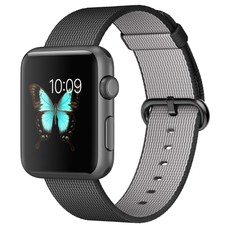
Apple Watch Sport 42mm Space Gray Aluminum Case Black Classic Buckle (MMFR2LL/A)
- $499.00
- Buy It Now
- +$22.43 shipping
- 1h left (Today 6:56AM)
- From United States
- Customs services and international tracking provided
- See more like this

No comments:
Post a Comment